 App Developer


Is Android Development really Hard? Setting Realistic Expectations
Before the deep dive, it's worth separating two different questions people usually mean when they ask "is Android development hard":
- Is it hard to learn the basics? No. A motivated beginner can build a working app with Kotlin and Jetpack Compose in a few weeks.
- Is it hard to build and maintain a production-grade app that behaves correctly for millions of real users on real devices? Yes, considerably.
Almost every frustrated forum post about Android being "so hard" is actually describing the second problem, not the first. The gap between it works on my emulator and it works reliably in the field is where Android earns its reputation.
Why Is Android Development Hard? The Complete 2026 Breakdown

Android development is hard, but not because the code is difficult to write. It's hard because you're never really building for "Android." You're building for thousands of hardware configurations, a dozen active OS versions, manufacturer software layers you don't control, a strict permissions and background-execution model, and a platform that updates on an annual cycle whether your app is ready or not. The syntax is the easy part. The environment is what breaks people.
This guide goes deeper than the usual "fragmentation and Gradle" answer. It walks through every layer that makes Android app development genuinely difficult in 2026, compares it honestly to iOS and cross-platform alternatives, and lays out what experienced Android developers actually do to make the difficulty manageable.
What Hard Actually Means in Android Development
In most programming domains, difficulty scales with logical complexity — harder algorithms, harder data structures, harder math. Android development is different: difficulty scales with variance, not complexity.
Engineers describe this as the test matrix problem. If your app needs to support 6 active OS versions, 4 screen-size buckets, and 5 major manufacturer skins, you are theoretically responsible for well over 100 behavioral combinations. Smart sampling narrows that to a realistic 15–20 configurations you actually verify before every release — but that verification work is where most of the "hardness" of Android development actually lives, not in the code itself.
Key term: Fragmentation is the simultaneous existence of many hardware and software variants of the same platform, all active in your user base at the same time, none of which you control.
Why Is Android Development Hard? 12 Core Reasons

Here's the full list of structural reasons Android app development is difficult, each covered in detail below:
- Device fragmentation is permanent, not temporary
- A new API level ships roughly every year
- The Activity lifecycle punishes assumptions
- Two UI toolkits and two languages coexist in most real codebases
- Gradle build times slow the feedback loop
- The permissions and privacy model keeps getting stricter
- Performance budgets are unforgiving
- Testing complexity multiplies with every device you support
- Jetpack libraries and AndroidX churn constantly
- Play Store policy and release management add friction
- Background execution is restricted and inconsistent across OEMs
- Multiple form factors now require design attention, not just phones
Android now runs on an estimated 3.9 billion active devices worldwide (StatCounter, 2026), spread across hundreds of manufacturers, and that number keeps growing because openness is Android's entire business model — it will never consolidate the way iOS has. That reach is exactly why companies choose Android, and exactly why it costs more to support well.
What fragmentation actually costs an engineering team:
- Layout debt. Notches, punch-hole cameras, foldable hinges, tablets, and desktop windowing modes all demand adaptive layouts instead of fixed ones.
- Chipset behavior differences. Camera pipelines, video encoding, and Bluetooth stacks behave differently across Qualcomm, MediaTek, Exynos, and Tensor silicon.
- Vendor battery managers. Several OEMs kill background work far more aggressively than stock Android does, so a sync job that works perfectly on a Pixel can silently fail on a budget phone from another brand.
- Font and display scaling. Real users commonly run 120%+ accessibility font scaling, which breaks any fixed-height component you didn't test against it.
The practical lesson every experienced Android developer learns the hard way: emulators alone will never catch this. Physical device variance is the single largest source of production bugs, which is why cloud device farms exist as a category.
Android 17 ("Cinnamon Bun") reached stable release in June 2026, following Android 16 in mid-2025 — continuing a cadence of roughly one major platform release per year. Google Play also enforces target-SDK deadlines, so you cannot simply freeze an app on an old SDK and ignore new versions indefinitely.
Reason 2: A New API Level Every Year, Whether You're Ready or Not
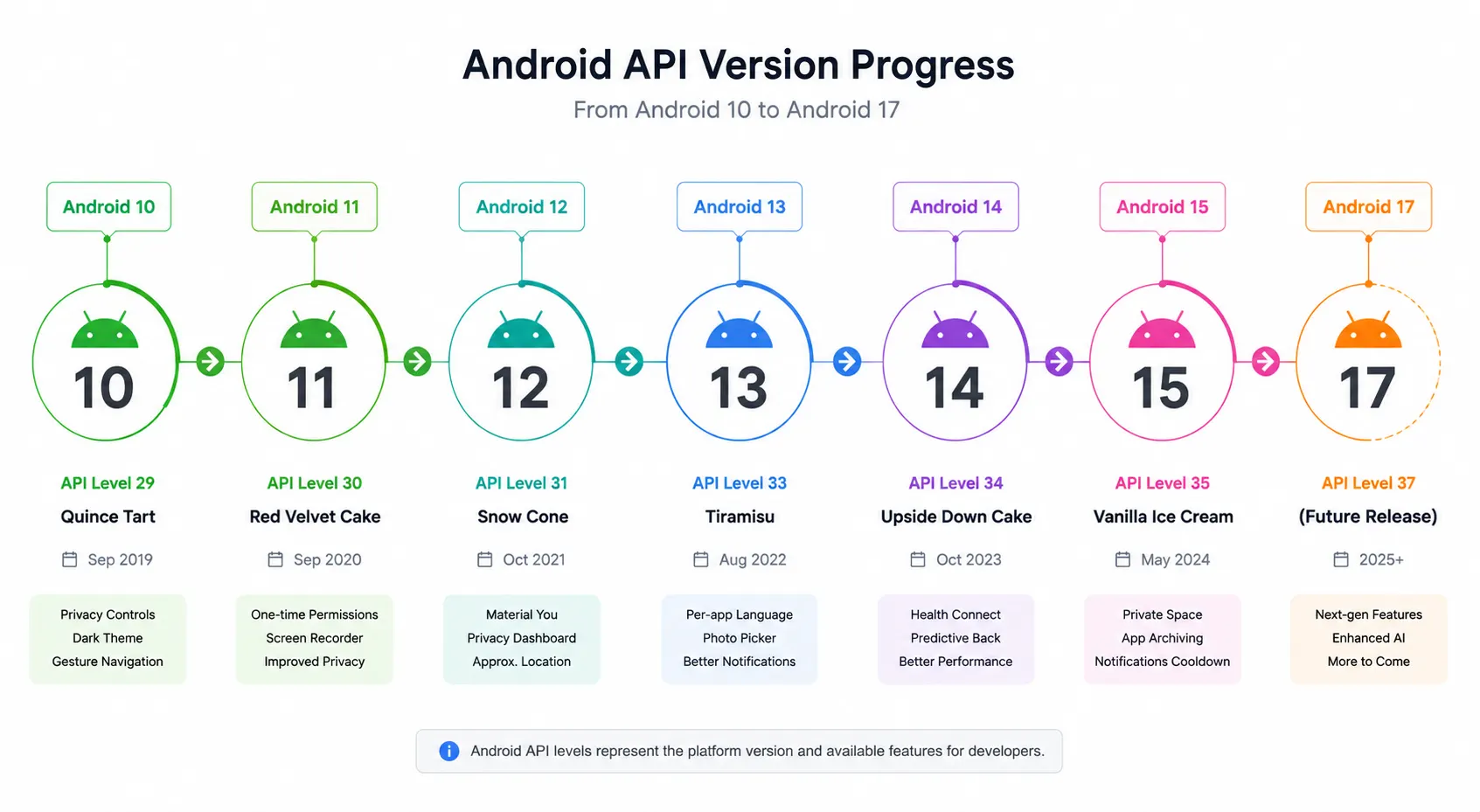
Real examples of features that have needed rewriting more than once in the last few years:
- Storage access moved from direct file paths to scoped storage, then to the system photo picker and granular media permissions.
- Background work went from unrestricted services, to JobScheduler and WorkManager, to mandatory foreground-service type declarations.
- Notifications first required channels, then a dedicated runtime permission.
- Exact alarms and full-screen intents both moved behind special, user-granted permissions.
Every one of these changes means writing branching logic — one path for newer OS versions, a compatibility path for older ones, and tests for both. This is why an Android codebase keeps growing in complexity even when the actual product feature set stays completely flat.
Reason 3: The Activity Lifecycle and Process Death Punish Assumptions
Android can kill your Activity at any time to reclaim memory, then recreate it and expect your app to restore state exactly as it was. Rotation, dark-mode toggles, language switches, split-screen, and plain process death in the background all trigger this.
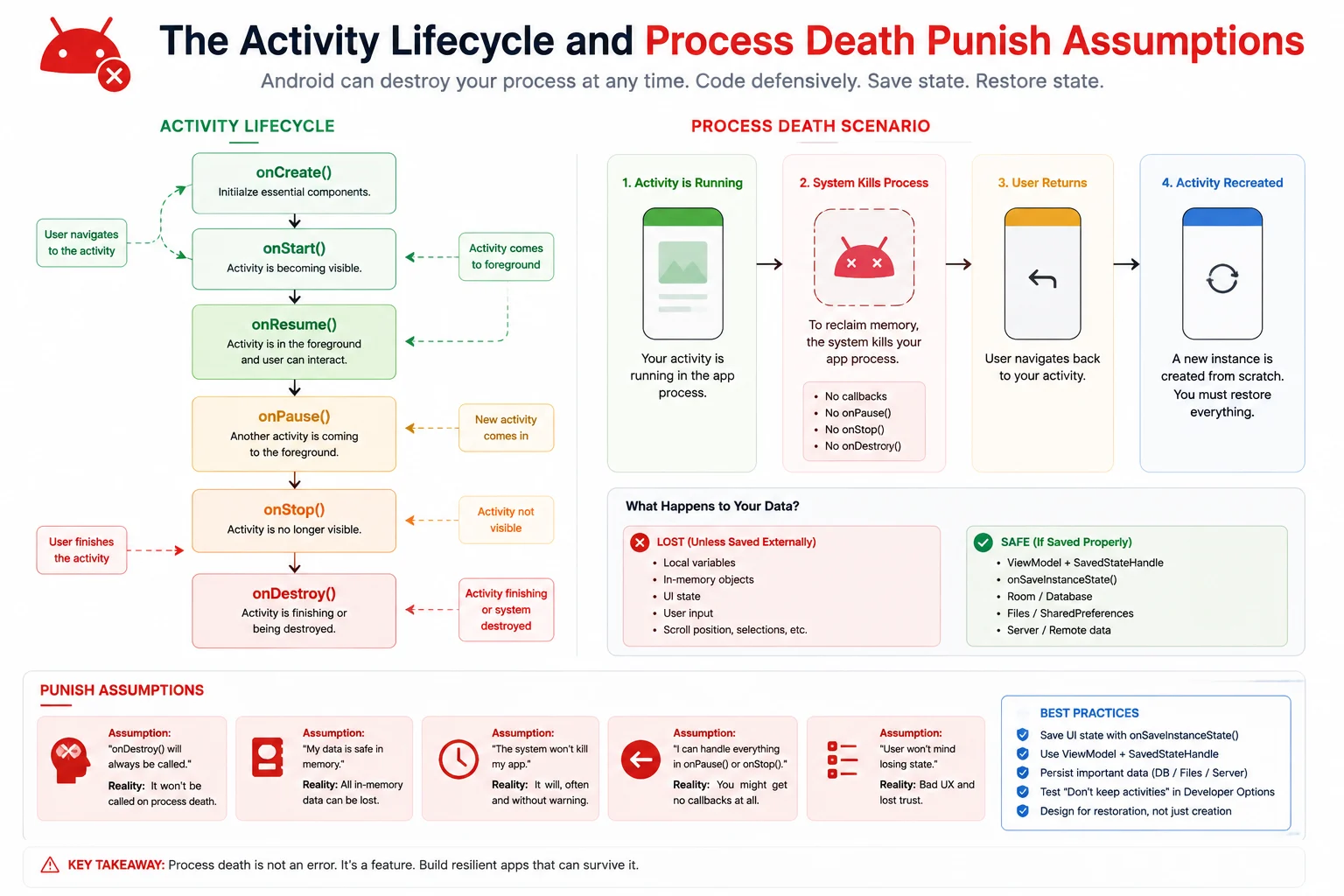
The frustrating part: most of these bugs don't show up on a fast developer device with 12GB of RAM. They show up in the field, on low-end phones, as blank screens, lost form input, or crashes on resume — the kind of bug reports that are nearly impossible to reproduce from a description alone.
Defenses experienced Android developers rely on:
- Persist meaningful UI state in SavedStateHandle, not just in memory.
- Test regularly with the "Don't keep activities" developer option enabled.
- Treat every asynchronous callback as something that might return after the screen no longer exists.
- Never hold an Activity or Context reference in a long-lived object — the single most common cause of Android memory leaks.
Reason 4: Two UI Toolkits and Two Languages, Often at Once
Most real-world Android codebases in 2026 are still mid-migration. Jetpack Compose is now the modern default, but a huge share of production apps still carry a legacy XML View layer, and many teams maintain a mix of Kotlin and older Java modules. That means:
- Two different state-management mental models living in the same app.
- Interop layers (ComposeView, AndroidView) that introduce their own lifecycle edge cases.
- Onboarding new engineers into two toolkits instead of one.
Compose genuinely reduces boilerplate and makes state-driven UI easier to reason about — but it doesn't retroactively simplify the View-based screens still sitting in your codebase, and migrating them is its own multi-quarter project.
Reason 5: Jetpack Library and AndroidX Churn
Android's own recommended libraries change faster than most external dependencies. Navigation, Room, Paging, WorkManager, and CameraX all receive breaking or semi-breaking updates on a regular cadence, and Google periodically issues new "recommended architecture" guidance that reshapes how apps should be structured.
Staying current isn't optional forever — outdated dependencies eventually block you from adopting new APIs, cause build tool incompatibilities, or trip Play Console warnings. But every upgrade cycle is its own mini-project with its own regression risk.
Reason 6: Gradle Build Times and Toolchain Overhead
Android builds are heavy by design. Gradle compiles Kotlin and Java, runs annotation processors, merges resources, processes the manifest, runs R8 shrinking, and packages a signed artifact — every time. On a large multi-module project, full builds of several minutes are completely normal, and that directly slows down the edit-compile-test loop that drives developer productivity.
What measurably helps:
- Enable Gradle configuration cache and build cache.
- Migrate annotation processors from kapt to KSP wherever the library supports it.
- Split the app into feature modules so incremental builds recompile less code.
- Use Compose Previews and Live Edit instead of full reinstall cycles for pure UI work.
- Keep debug builds free of minification, and push heavier static analysis into CI instead of the local loop.
This is genuinely one place where web development has an edge — hot reload in a modern web stack is close to instantaneous, while native Android iteration is still comparatively heavy even with every optimization applied.
Reason 7: The Permissions and Privacy Model Keeps Getting Stricter
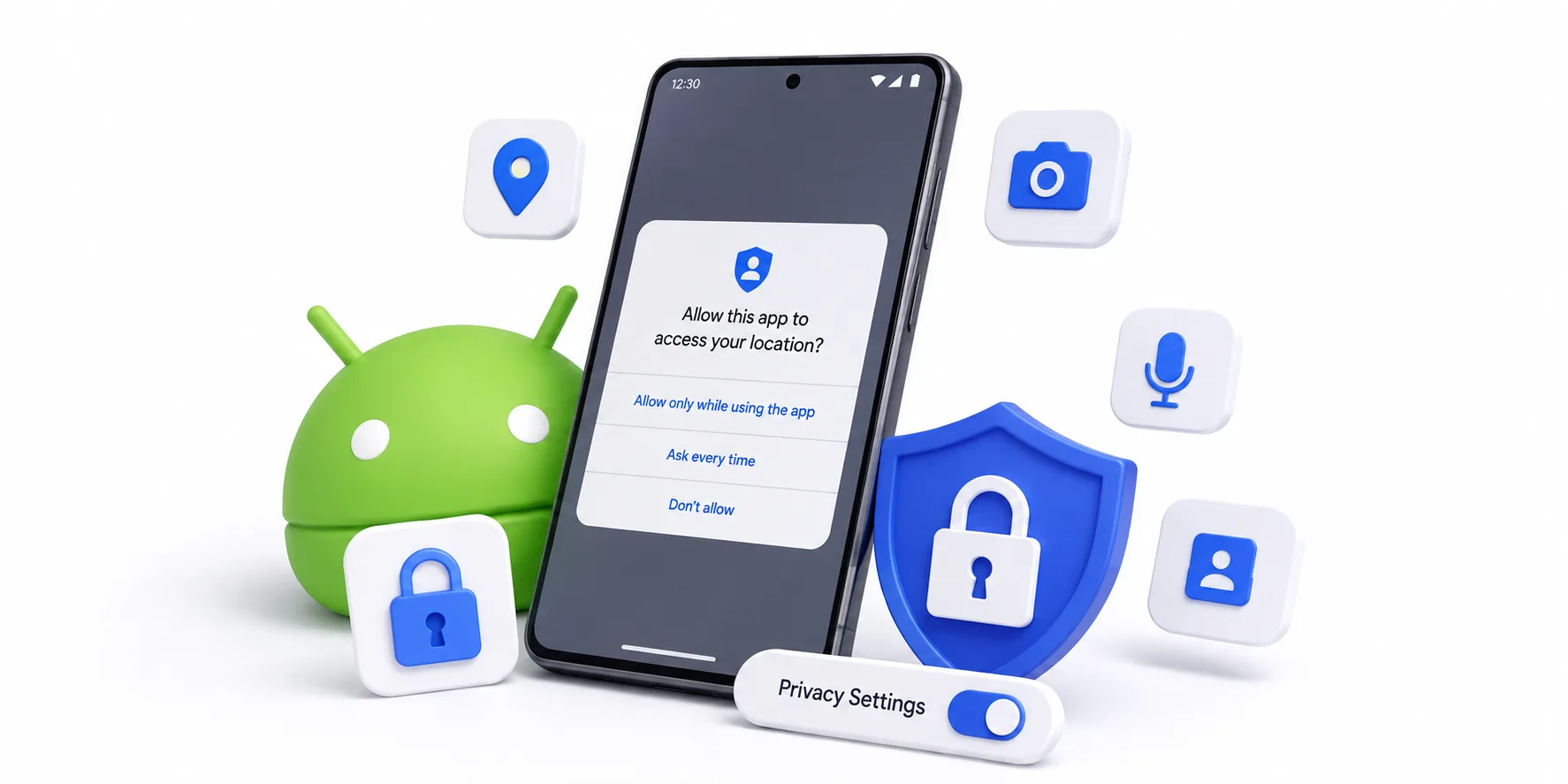
Android's security model has evolved from simple install-time permissions to runtime prompts, one-time grants, granular media access, background-location justification forms, and Play Console data-safety declarations. Each layer is genuinely good for users and genuinely more work for developers.
A correct permission flow in 2026 requires:
- Checking the current grant state at the moment of use — never once at app startup.
- Handling "denied once" and "permanently denied" as two distinct states with different UX.
- Showing in-app rationale before triggering the system dialog.
- Degrading gracefully when a user grants partial access (selected photos only, approximate location only).
- Declaring sensitive permission usage clearly in the store listing, with real rejection risk if the justification is weak.
On top of that, apps run on devices that may be rooted, so certificate pinning, encrypted storage via the Android Keystore, and code obfuscation are now baseline expectations rather than "nice to have."
Reason 8: Performance Budgets Are Unforgiving
Android apps compete for a shared battery, a shared thermal envelope, and often modest RAM. At 60Hz you have about 16.6 milliseconds to render a frame before users perceive stutter; at 120Hz that budget shrinks to roughly 8.3 milliseconds. Any main-thread work that blows past that window becomes visible jank.
The recurring performance traps:
- Disk or database reads happening on the main thread during app startup.
- Full-resolution bitmaps decoded into small thumbnail views.
- Unbounded recomposition in LazyColumn or RecyclerView lists.
- Wake locks and frequent network polling that drain battery and trigger OEM throttling.
- Cold-start regressions caused by a heavy dependency graph initializing at application launch.
Android Vitals in Google Play Console surfaces these metrics directly, and poor vitals can reduce your app's visibility in the store — which means performance in Android development is a distribution problem, not just an engineering nicety.
Because of everything above, "does it work" is never a single answer in Android — it's a matrix. A responsible release process typically needs:
Reason 9: Testing Complexity Multiplies With Every Device
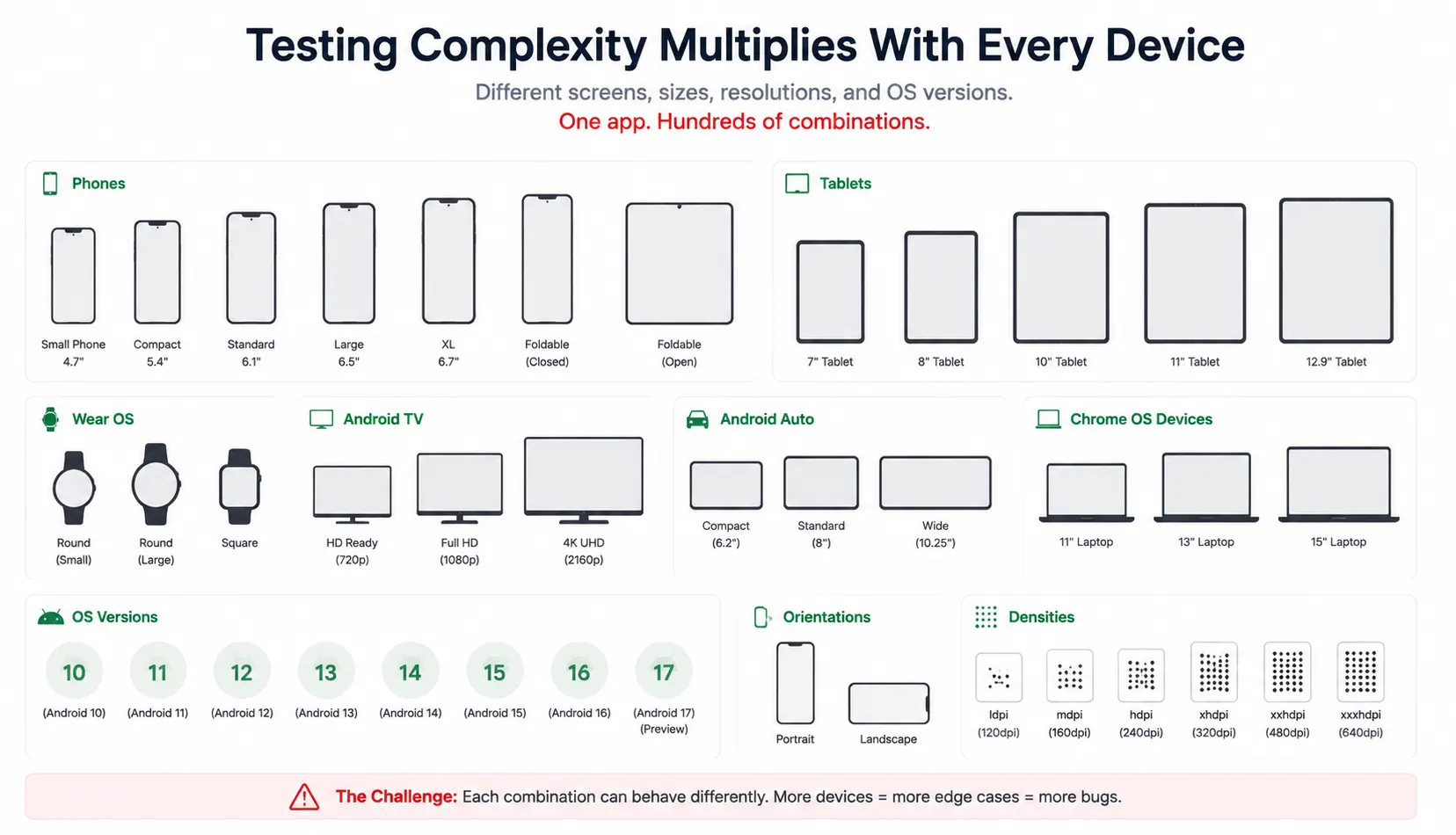
- Unit tests for business logic.
- Instrumented tests that run on-device.
- UI tests across at least a low-end, mid-range, and flagship device.
- Manual verification on at least one foldable and one tablet if your app supports them.
- Screenshot/regression testing to catch subtle layout breaks across screen sizes.
Cloud device farms exist specifically because OEM-specific bugs — the ones caused by a manufacturer's custom camera stack or battery manager — essentially never show up on an emulator.
Reason 10: Play Store Policy and Release Management
Beyond the code, Android app development includes an entire operational layer: staged rollouts, pre-launch reports, data-safety forms, target-API deadlines, and policy reviews for sensitive permissions. Play Store review is generally faster than Apple's App Store review, but it introduces its own recurring compliance overhead — and a rejected data-safety declaration or a missed target-SDK deadline can pull an app's updates entirely.
Reason 11: Background Execution Is Restricted — and Inconsistent
Stock Android's background execution limits are already strict, but several major OEMs layer their own, more aggressive battery managers on top. An alarm, sync job, or push-triggered background task that behaves perfectly on a Pixel can be silently killed on a phone from a manufacturer with an aggressive "battery optimization" feature enabled by default. There's no fully reliable code-only fix for this — it requires user education (whitelisting the app) and defensive design (WorkManager with appropriate constraints, avoiding reliance on exact timing).
Reason 12: Multiple Form Factors Now Require Real Design Attention
Phones used to be the whole story. In 2026, a serious Android app may also need to work well on foldables, tablets, Wear OS, Android Auto, Android TV, and increasingly Android XR headsets. Each form factor has its own input model, layout constraints, and lifecycle quirks — adaptive layout is no longer optional polish, it's baseline expectation for anything beyond a single-purpose phone app.
Why Is Android Development So Hard for Beginners?
If you're new to mobile and asking "why is Android development so hard," the honest answer is that beginners run into a different set of difficulties than production teams do — front-loaded rather than spread across a codebase's lifetime:
- Too many moving parts to learn at once. A beginner needs Kotlin, Gradle, XML or Compose, the Activity/Fragment lifecycle, and Android Studio itself — all before writing a meaningful feature.
- Error messages that don't explain themselves. Gradle sync failures and manifest merge conflicts are notoriously unfriendly to newcomers compared to, say, a Python stack trace.
- The emulator hides real problems. Beginners test almost exclusively on a fast emulator, so lifecycle bugs and low-memory crashes — the exact bugs that define "real" Android difficulty — don't appear until much later, often after publishing.
- Documentation spans multiple eras. A search for how to do something in Android often surfaces three different "correct" answers from three different API eras, and it's not always obvious which one is current in 2026.
The good news: none of this reflects a ceiling on how hard Android development stays. It reflects a steep initial ramp, followed by a much gentler curve once the fundamentals — lifecycle, state management, and asynchronous work — actually click.
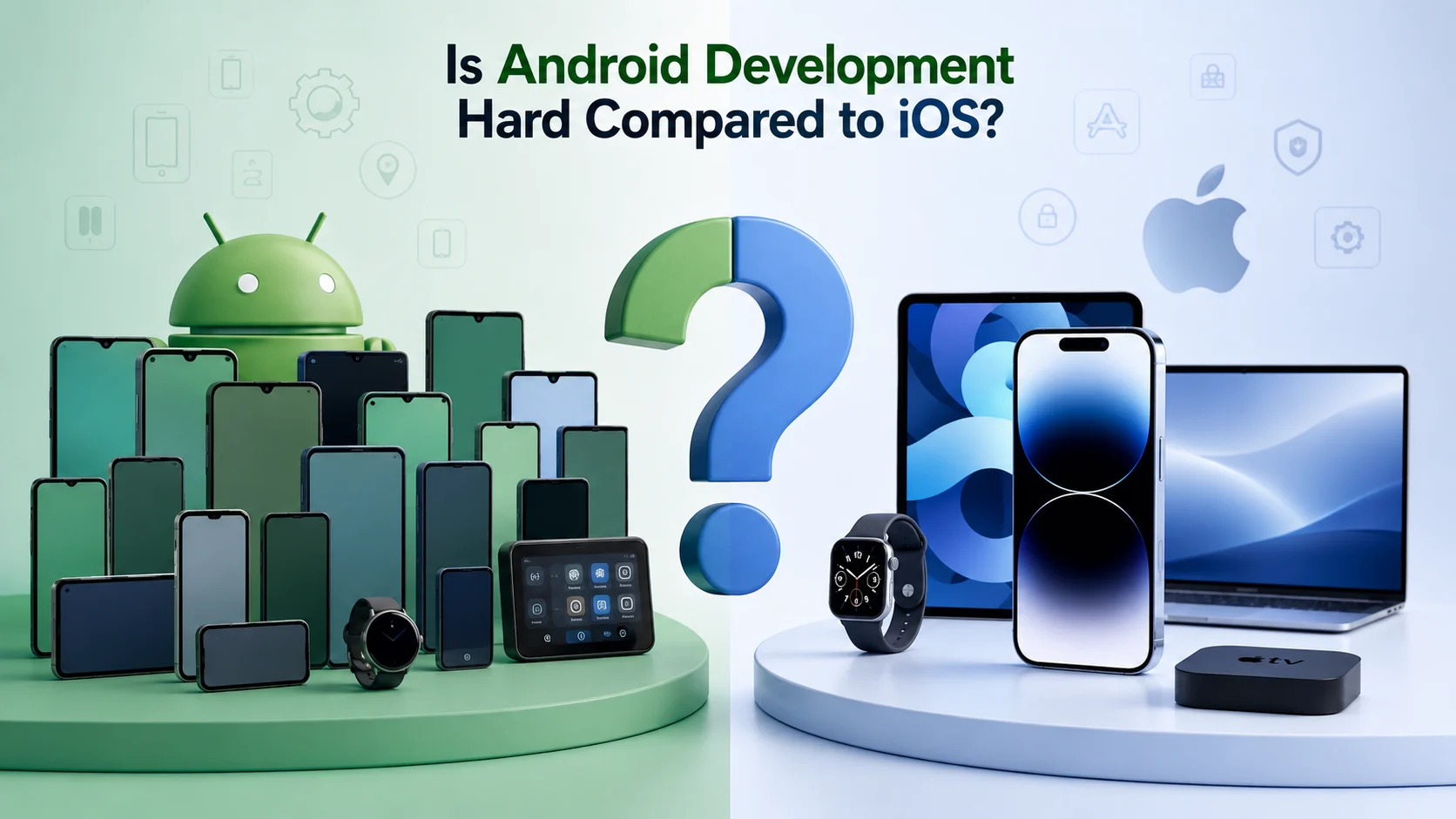
Is Android Development Hard Compared to iOS?
Both platforms are demanding, but the difficulty sits in different places. This is what teams shipping on both consistently report:
| Factor | Android | iOS |
|---|---|---|
| Device and screen variants | Very high — thousands of models | Low — a controlled device list |
| OS version spread in active users | Wide — several versions matter | Narrow — adoption is fast |
| Manufacturer software changes | Significant, varies by OEM | None — single vendor |
| Build and iteration speed | Slower, Gradle-heavy | Generally faster on comparable projects |
| Testing cost | Higher — needs device farms | Lower — fewer combinations |
| Store review friction | Lower, faster reviews | Higher, stricter review |
| Background execution rules | Restrictive and OEM-dependent | Restrictive but predictable |
| Monetization ceiling | Lower revenue per device | Historically higher revenue per device |
Is Android Development Hard Compared to Flutter or Cross-Platform Tools?

Cross-platform frameworks like Flutter, React Native, and Kotlin Multiplatform don't eliminate Android's underlying difficulty — they relocate some of it. You still ship to the same fragmented device population, you still need to test on real hardware, and you still hit platform-specific bugs at the native bridge layer. What you typically gain is faster UI iteration and one shared codebase for business logic across platforms.
The realistic trade-off:
- Native Android (Kotlin/Compose) gives the most control over performance, platform APIs, and OEM-specific edge cases — at the cost of a separate iOS codebase.
- Kotlin Multiplatform shares business logic while keeping native UI on each platform, which many teams now treat as the middle ground.
- Flutter/React Native maximizes UI code sharing but still needs native-level debugging for camera, background work, and deep platform integrations.
None of these choices make Android's device and OS fragmentation disappear. They change where in your stack you deal with it.
How Long Does It Take to Learn Android Development?
Most developers can write a functional app within three to six months of focused practice with Kotlin and Jetpack Compose. Reaching genuine production competence — correct lifecycle handling, permission flows, background work, and performance tuning — usually takes twelve to eighteen months of real project experience, not tutorial-following. That second stretch is where "is Android development hard" stops being a beginner question and starts being a professional one.
How Experienced Teams Make Android Development Easier

Android doesn't get easier by working longer hours on it. It gets easier by deliberately shrinking the variance you're exposed to. A workflow that reliably works in practice:
- Define a supported device tier list. Pick one low-end, one mid-range, one flagship, plus a foldable and a tablet if relevant, and treat those as your release gate — not "whatever's on my desk."
- Set minSdk from real analytics, not sentiment. Dropping old, low-usage OS versions often removes entire classes of compatibility code for negligible user loss.
- Automate the test matrix. Instrumented tests on a cloud device farm catch OEM-specific failures no emulator will ever surface.
- Standardize on one UI toolkit. Mixing legacy Views and Compose across a codebase roughly doubles the state and styling surface you have to reason about.
- Track Android Vitals as a product metric. Crash-free sessions, cold-start time, and ANR rate belong on the same dashboard as retention and revenue.
- Isolate platform APIs behind interfaces. When the next API level changes storage or notifications again, you edit one adapter class instead of forty call sites scattered through the app.
Teams that treat these as standard practice consistently ship faster than teams that treat Android as a place where only the code matters.
Is Android Development Still Worth Learning in 2026?
Yes, and the difficulty is exactly why. Android's install base — an estimated 3.9 billion active devices and around 69–72% of global mobile OS share — means the skill remains in steady demand precisely because the verification and fragmentation problem doesn't fully automate away. Companies specifically pay for developers who've internalized lifecycle handling, permission edge cases, and performance tuning, because that judgment is what separates an app that "works in the demo" from one that holds up in production. If anything, the difficulty is the moat: it's why experienced Android developers remain harder to replace than the raw language skills alone would suggest.
Key Takeaways
- Android development is hard mainly because of variance — device models, OS versions, and OEM software layers multiply verification effort far beyond the coding itself.
- Roughly 3.9 billion active devices run Android worldwide, which is both the market opportunity and the fragmentation cost.
- A new major API level ships roughly every year — Android 17 arrived in June 2026 — and Google Play's target-SDK deadlines make ignoring it impossible.
- Frame budgets are about 16.6 ms at 60Hz and 8.3 ms at 120Hz, so any main-thread work over budget causes visible jank.
- Gradle build overhead slows iteration; configuration cache, KSP, and modularization are the standard fixes.
- Runtime permissions now require rationale, partial-access handling, and store-level justification — not a one-time startup check.
- For beginners specifically, the difficulty is front-loaded: too many tools at once, unfriendly build errors, and an emulator that hides the real bugs.
- The single strongest mitigation at any experience level is a defined device tier list plus automated testing on real hardware.
Sources & Further Reading
This guide draws on current official documentation and platform data rather than general impressions. For deeper technical detail on any of the points above:
- Android 17 is here — Android Developers Blog, official release announcement
- Meet Google Play's target API level requirement — Android Developers
- Data and file storage overview (scoped storage) — Android Developers
- Background work with WorkManager — Android Developers
- Saved State module for ViewModel — Android Developers
- Jetpack Compose — Android Developers
- Request runtime permissions — Android Developers
- Android Keystore system — Android Developers
- Android Vitals — Android Developers
- Kotlin Multiplatform — Android Developers
- Mobile Operating System Market Share Worldwide — StatCounter Global Stats
Frequently Asked Questions
Why is Android development hard?
Because beginners are learning several systems at once — Kotlin, Gradle, the Activity lifecycle, and Android Studio's tooling — while testing almost exclusively on a fast emulator that hides the real-device bugs that define Android's difficulty. The ramp is steep early on and flattens significantly once lifecycle and state management click.
Is Android development hard compared to iOS?
Android is harder to keep consistent; iOS is harder to get approved. Android developers manage a huge range of device variants, several active OS versions, and manufacturer customizations. iOS developers face fewer devices but a stricter, slower review process. Most teams building for both report Android as the higher testing-cost platform overall.
Is Android development hard to learn from scratch?
The basics are approachable — most people can build a working app within a few months using Kotlin and Jetpack Compose. What's genuinely hard is reaching production competence: correct lifecycle handling, permissions, background work, and performance tuning, which typically takes twelve to eighteen months of real project work.
Does Jetpack Compose make Android development easier?
Yes, for building interfaces specifically. Compose cuts boilerplate, removes most XML layout work, and makes state-driven UI much clearer to reason about. It does not remove device fragmentation, permission complexity, or background execution limits — it improves how you write screens, not how many device configurations you still have to verify.
Why do Android apps behave differently on different phones?
Because manufacturers modify Android before shipping it. Battery optimizers, notification handling, camera stacks, and default fonts all vary by brand. Two phones running the identical Android version can execute the same code with different results, which is exactly why testing on physical devices from multiple manufacturers is non-negotiable before release.
Why are Android build times so slow?
Gradle compiles Kotlin/Java, runs annotation processors, merges resources, shrinks the build with R8, and signs the final artifact on every build, and large multi-module projects amplify all of it. Enabling the configuration cache, migrating from kapt to KSP, and modularizing the codebase are the most effective fixes for a slow local feedback loop.
Is native Android development still worth it over Flutter or React Native in 2026?
It depends on the priority. Native Android gives the most control over performance and platform-specific APIs, which matters for camera-heavy, background-work-heavy, or hardware-integrated apps. Cross-platform tools trade some of that control for shared UI code across iOS and Android — but they don't remove Android's device and OS fragmentation, they just relocate where you deal with it.
Should I build an Android app or a web app first?
Start with a web app to validate demand quickly, reach desktop users, or ship an internal tool. Choose Android first when the product genuinely needs camera access, offline support, background sync, push notifications, or app-store distribution. Building the API layer first keeps both paths open without having to redo backend work later.