 App Developer

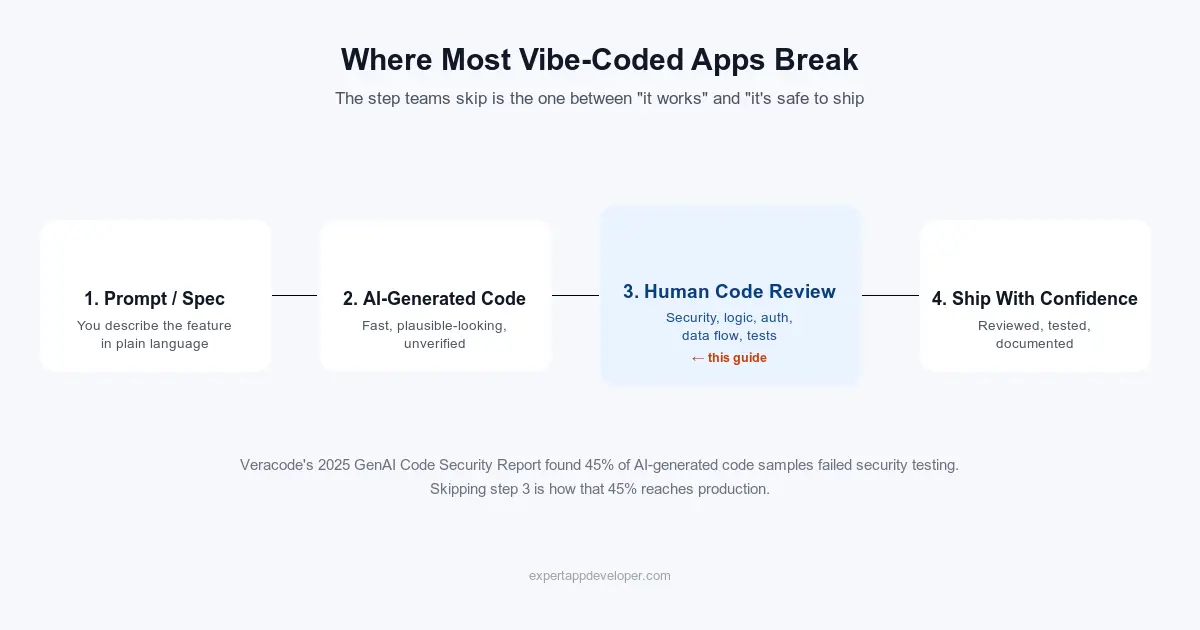
Vibe coding can build you a working app in one afternoon. But is that app safe for real people to use? That is a totally different question. Most people skip this question, because the demo worked, and skipping it feels free. It is not free. You just have not paid the cost yet.
This is a simple, practical guide to checking AI and vibe-coded app code before you launch it — no matter if the code came from Cursor, Claude Code, Lovable, Bolt, Replit Agent, Base44, v0, or plain ChatGPT. You will get the exact steps I use, a checklist you can save, a real bug with real code, free tools that do the boring work for you, and a ready-to-copy prompt for cleaning up the code afterward.
What Is "Vibe Coding"? (And Why It Still Needs a Review)
"Vibe coding" means you describe what you want in plain words, and an AI writes — and often runs — the code for you. You check if it works, instead of reading every line. This covers two different situations. One: a founder builds a whole app inside a tool like Lovable or Base44, with almost no code written by hand. Two: a professional developer lets an AI write large parts of the code inside a normal project, using tools like Cursor, Copilot, or Claude Code. The review steps in this guide work for both. The only difference is how much code you are checking at once.
- Full app builders — Lovable, Bolt.new, Replit Agent, Base44, v0. You type what you want, and these tools build a whole working app for you. Often, you never even see the code.
- AI coding assistants — Cursor, GitHub Copilot, Claude Code, Windsurf. These write and edit code inside a project you already control.
- Chat-based coding — you paste your idea into ChatGPT or Claude, then copy the answer straight into a file. There is no comparison view, and the AI has no idea what the rest of your code looks like.
The trap is always the same: AI code looks finished. It runs with no errors, the screen looks right, and the one thing you clicked on worked. None of that proves the code is correct or safe. It only proves that one click worked. A working demo is not the same thing as a real review.
From My Experience Reviewing Vibe-Coded Code
From my experience as a developer checking vibe-coded apps, the problems in this guide are real — not made up. They are the same handful of mistakes I see in almost every AI-built app I open: a check that exists on the button, but not on the server behind it. A key or password that was "deleted," but is still hiding in the project's saved history. An error that fails quietly instead of showing a warning. The checklist and steps below come straight from these repeated mistakes.
Why You Should Double-Check and Review AI Code
Security bugs get most of the attention. But they are not the only problem with AI-written code — they are just the scariest ones. Here are the other problems I run into again and again, in almost every vibe-coded app I open, security aside.
- Extra code that quietly slows the app down. Extra loops, extra screen updates, or data loaded "just in case" and never used. None of this shows up when you test with a little bit of data. All of it shows up once real users and real data arrive.
- Sending back more data than a page needs. AI often sends the entire database record, instead of just the two or three pieces of information the screen actually shows. At best, this wastes bandwidth. At worst, it leaks information a user should never see.
- Forcing two different things to share one piece of code. AI often builds one shared component or function for two features that only look similar, instead of writing each one on its own. It looks "clean" at first. But now the two features are tied together — change one, and the other quietly breaks.
- Security problems, especially with logins and permissions. This guide covers this in detail further down — but it is worth saying here too: this is the single most common type of problem, not a rare exception.
- Every app looks the same. Big rounded corners, the same card layout, the same colors and spacing. Most AI tools were trained on the same patterns, so apps built by completely different people end up looking like copies of each other.
- Sending the same request over and over. The same data gets requested three or four times instead of once, because nothing is saved or reused. This costs extra money on paid APIs, and makes the app feel slower than it should.
- Code that works but is hard to read. Mixed-up naming, huge files that do five unrelated jobs at once, and comments that just repeat what the code already says instead of explaining why it is there.
And that is not even the full list — it is just what keeps repeating often enough to name. None of this means you should stop vibe coding. It just means checking the code is not optional.
Why Free Scanning Tools Are Not Enough on Their Own
Further down this page you will find a list of free tools. Use them — they really do save time, catching in minutes what would take an hour by hand. But a scanning tool can only compare your code to patterns it already knows. It cannot tell you a permission check is missing, if it does not know what "allowed" means for your app. It cannot tell you a feature was never finished. And it cannot tell you the AI misunderstood your idea and built the wrong thing perfectly. That kind of judgment still needs a human — and it is the part of the review that matters most.
What the Numbers Say About AI Code and Security
Veracode's 2025 report is one of the most trusted studies on this topic, and the real numbers are worth seeing. It is easy to brush off "AI code has bugs." It is much harder to brush off a 72% failure rate.
- Failed security testing (%)
Java scored worst, failing 72% of the time. Python scored best, at 38%. JavaScript and C# landed in between. On average, code failed 45% of the time, no matter which AI wrote it. The single most common problem was cross-site scripting — a bug where text one user types can end up running as code on another user's screen. AI tools failed to stop this in 86% of the tests. If your app shows any text a user typed — a comment, a bio, a chat message — assume this bug is there until you have checked it yourself. The OWASP Top 10 list explains the most common security problems in plain terms, and the OWASP Cheat Sheet Series shows you exactly how to fix each one.
How to Rank the Problems You Find
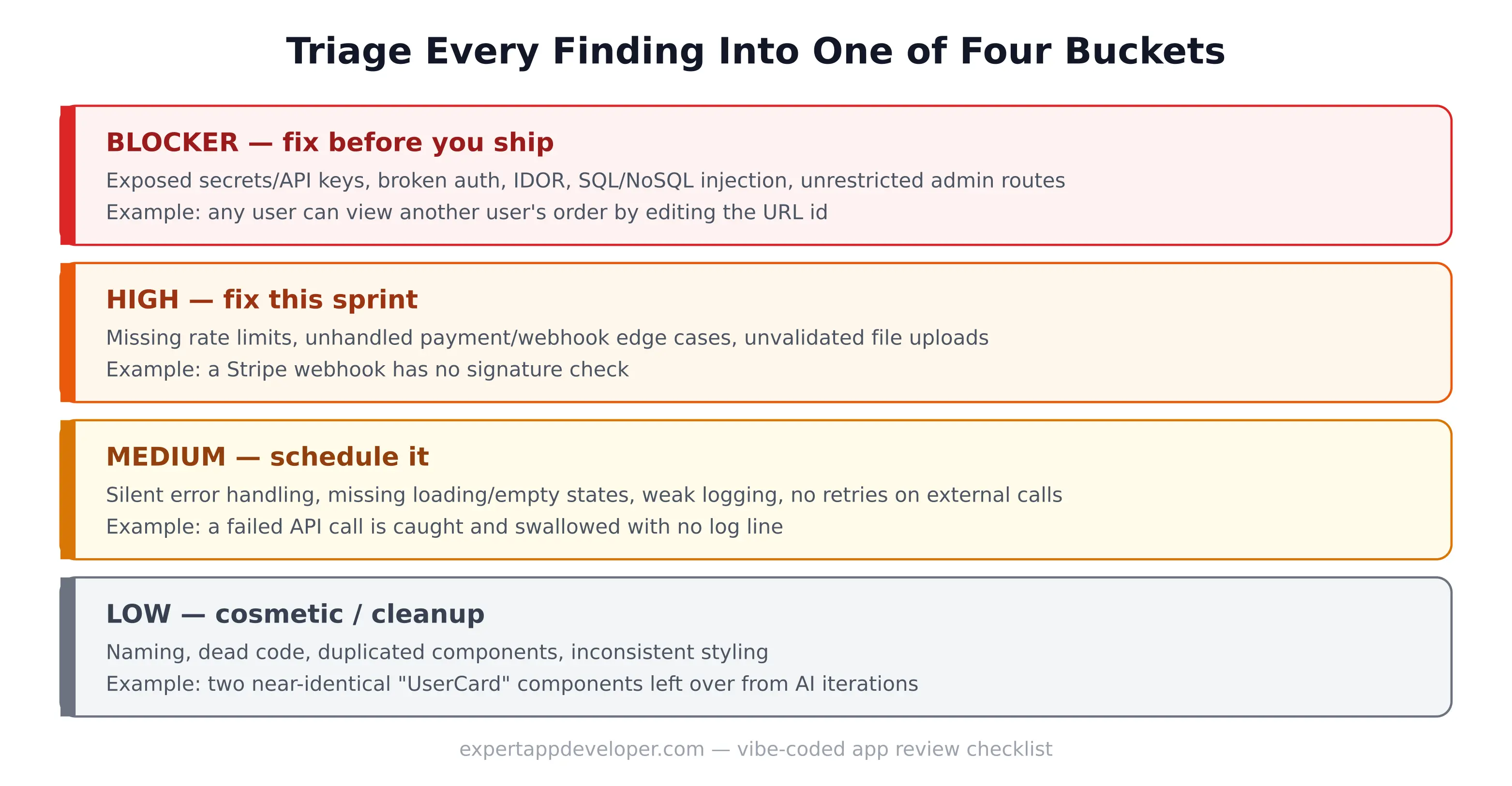
Not every problem you find is equally important. Before you fix anything, sort each one into one of four groups. This stops you from spending an entire afternoon on a small typo while a real security hole waits.
| How Serious | What It Means | Example | What To Do |
|---|---|---|---|
| Blocker | Anyone could use this to steal money or private data | Any logged-in user can see someone else's order just by changing a number in the address bar | Fix this before you launch. No exceptions. |
| High | Someone could realistically break this | A payment notification is never checked to see if it is real | Fix this week |
| Medium | Makes the app less reliable, but is not dangerous | A failed request is ignored quietly — no warning, no retry | Add it to your to-do list |
| Low | Just messy, not a real problem | Two almost-identical pieces of code left over from earlier AI attempts | Clean it up later, all at once |
The Vibe-Code Review Checklist
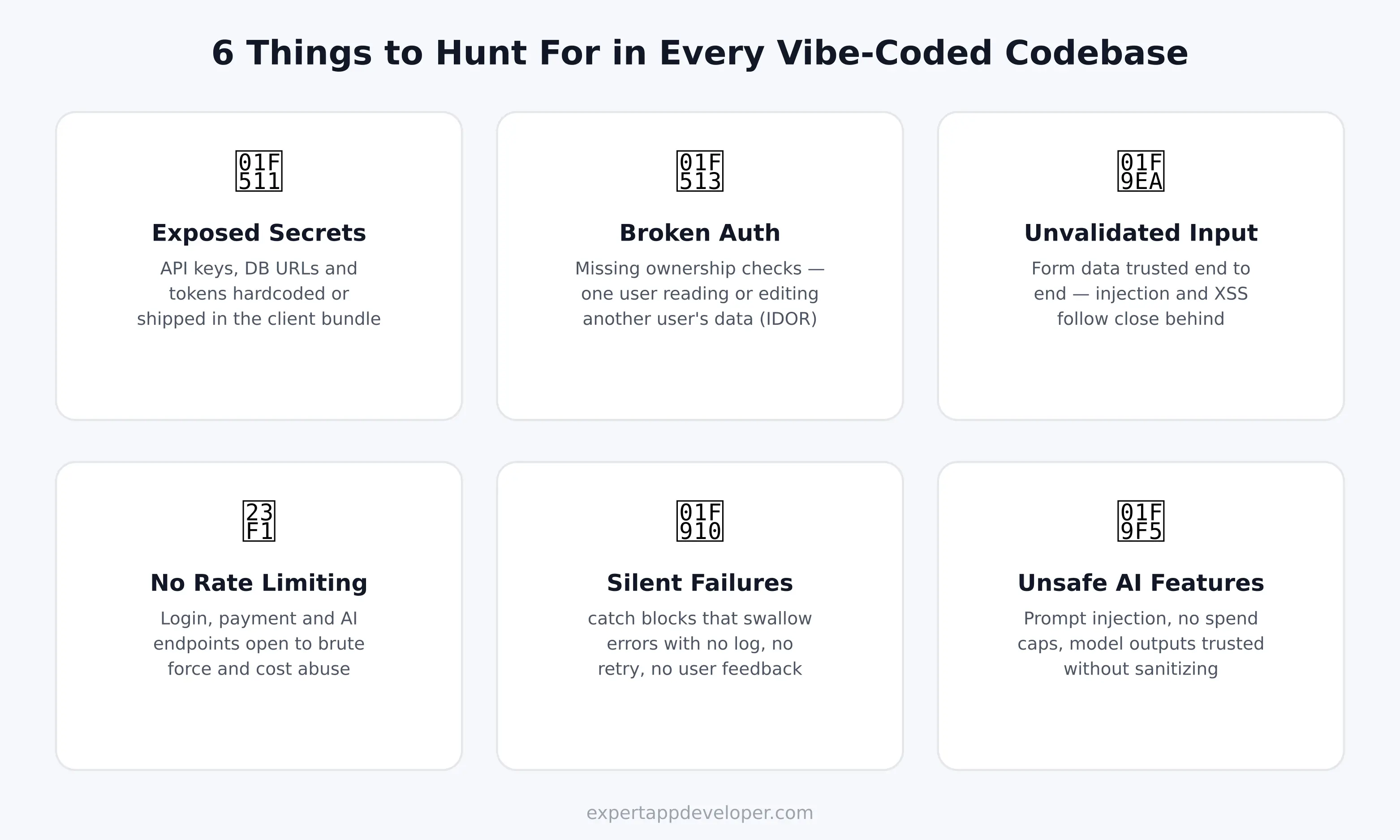
Save this list. Go through it from top to bottom before any vibe-coded app reaches real users — it is the short version of everything explained in the step-by-step section below.
- No passwords, keys, or secret codes anywhere in the project — not in the files, not in the saved history, and not in the code sent to the browser.
- Every private page and every server request checks two things: is someone logged in, and is this actually their own data.
- Everything a user types is checked on the server, not just in the browser. Database questions are always built safely — never by gluing user text directly into a database command.
- Login, sign-up, password reset, payments, and any AI feature all limit how many times someone can try in a row.
- Every outside connection — payments, email, AI — has a time limit, a way to retry, and a clear error message if it fails. Nothing fails silently.
- Payment situations are tested: a card that gets declined, a payment notification sent twice, a plan changed halfway through the month.
- Payment notifications check that they are genuinely real, and running the same one twice never charges someone or sends something twice.
- Any AI feature cannot be easily tricked by user text into ignoring its instructions, and has a strict limit on how much it can cost per user.
- The main paths are tested by hand, start to finish: sign-up, login, password reset, checkout — and tested on a real phone, not just a small browser window.
- No leftover, unused, or half-finished code left over from earlier AI attempts.
How to Review a Vibe-Coded App, Step by Step
This is the exact order I follow during a real review. Each step is quick on its own. The real value comes from doing all ten steps in order, instead of just glancing and asking "does this look okay?"
1. Compare What You Asked For With What You Got
Before opening any file, put your original request next to what the AI actually changed. You are looking for two things. First, extra changes — files that got touched for no clear reason, which is often where new bugs hide. Second, missing changes — something you clearly asked for that quietly never got done. AI tools are very good at looking finished even when they are not. Comparing the result to your original request is the only reliable way to catch this.
2. Search the Whole Project for Leaked Passwords and Keys
Do this before reading any actual code. It takes thirty seconds, and it can catch the single most dangerous type of mistake.
This only checks the files you have right now. A key that was added and then "deleted" is often still hiding in the project's saved history, where anyone who copies the project can still find it. So also run a free tool called Gitleaks to check the full history: gitleaks detect --source . -v. If a real key was ever uploaded to a public project, change that key no matter what the scan says — treat it as already leaked.
3. Test Logins and Permissions the Hard Way
This check finds the most damaging bugs, and it is the one people skip the most — because it takes two test accounts instead of one. Create two test users. Log in as User A, open any page showing "your" information, and note the number or ID in the address bar or in your browser's developer tools. Log out, log in as User B, and put that same number back into the address bar or request. If User B can now see or change User A's data, you have found a serious bug. It has a name — IDOR, which just means "someone can reach data that is not theirs by guessing or changing an ID." This is a Blocker. Fix it right away, do not save it for later. See the real code example further down to see exactly what this looks like.
4. Follow User Input All the Way to the Database
Pick one form on your app and follow what happens to the text someone types into it, step by step, all the way to the database. Write it out on paper if that helps. Here is a useful trick: ask the AI directly, "show me every place in this code where user input is joined directly into a database question." AI tools tend to answer a direct question like this more honestly than they write safe code by default — because now you are asking it to check its own work, not build something new.
5. Try to Break It on Purpose
AI tools usually test their own work by clicking through it once, the "correct" way. You need to try the things real users actually do: submit a form with nothing in it, submit way too much text, submit the wrong type of information, click "submit" twice fast, turn off your internet mid-request, or slow your connection down in your browser's developer tools. Vibe-coded apps almost never handle any of this well, unless someone specifically asked for it.
6. Check the Parts That Involve AI
If your app itself talks to an AI model, check that part separately — it breaks in ways normal code does not. Watch for: instructions a user can trick or override just by typing the right words (this is called "prompt injection"), no limit on how much one user can spend, the AI pulling in a private document it should not be able to see, or an AI that is allowed to write files or visit any website on its own.
7. Make Sure There Are Limits on Repeated Requests
Login, sign-up, password reset, payments, and any AI feature should all block someone from trying too many times, too fast. Vibe-coded apps almost never have this by default, because it never shows up in a demo. It only shows up the first time someone writes a script to guess passwords, or runs your AI feature in a loop and sends you a huge bill.
8. Look for Errors That Fail Silently
This command finds spots in the code where an error happens and nothing is done about it. AI tools do this a lot, because "handle the error nicely" often just means "make the red warning text disappear." But an empty response to an error does not handle it nicely — it just hides it. And hidden errors are the ones you find out about from an angry customer email, not from a warning message.
9. Find Old, Unused, or Duplicate Code
This happens a lot with AI coding: you ask for "a different approach" without deleting the old one, and now you have UserCard, UserCardV2, and UserCardFinal all sitting in the same project — but only one of them is actually being used. This is not dangerous by itself. But it causes real confusion, and it is exactly how the next AI change ends up editing the wrong copy.
10. Rank Everything, Fix It, Then Check Again
Put everything you found into the severity table from earlier. Fix every Blocker first, before touching anything small or cosmetic. Then clean up the code in small groups, without changing how it behaves. After each small group, test that specific part again — do not wait until the very end to test everything at once, because by then it is much harder to tell which change broke what.
A Real Example: Finding and Fixing a Real Security Bug
Here is a simple version of a bug I have found in more vibe-coded apps than I can count. It is an "orders" page on the server that trusts a user ID sent by the browser, instead of checking who is actually logged in. It passes every manual test perfectly, because whoever tested it was always testing as themselves.
It passes the demo because the demo always uses its own ID. But change ?userId= in that same request to someone else's ID — while still logged in as yourself — and it hands back their orders instantly. No error, no warning. The database question itself is correct. It is just a question nobody should have been allowed to ask.
The fix is just one line. That is exactly why this bug is so common: it is cheap to fix, but easy to never notice, because the broken version does not look broken at all. This is exactly why step 3 above is its own separate step, instead of something you just happen to notice.
The scariest bugs in a vibe-coded app are not the ones that crash it. They are the ones that work perfectly for the person who built it — and quietly fail for everyone else.
A Ready-to-Copy Prompt for Cleaning Up Code
Once the Blockers are fixed, clean up the code carefully and in small pieces. Do not let the AI "clean up while it's in there" — that is how a one-line fix turns into changes across fifteen files, which you can no longer safely check. This prompt keeps the AI focused:
Use this prompt on one small part at a time — not once for the whole app. After each run, test the specific thing you changed before moving to the next part. That is the difference between "I cleaned it up" and "I cleaned it up, and I know it still works."
Free and Paid Tools for Reviewing AI Code
None of these tools replace a human check. They just handle the boring, repetitive part, so you can spend your time thinking instead of searching line by line. Most of the tools below are free.
| Tool | What It Finds | Cost | Website |
|---|---|---|---|
| Gitleaks | Passwords and keys left in your code, including old, "deleted" ones | Free, open source | github.com/gitleaks/gitleaks |
| TruffleHog | Leaked passwords and keys — and checks if they still work | Free (OSS) + paid tiers | trufflesecurity.com |
| Semgrep | Common security mistakes, found by reading your code, in 30+ languages | Free (OSS) + paid platform | semgrep.dev |
| OWASP ZAP | Tests your live, running app for common attacks | Free, open source | zaproxy.org |
| CodeQL | A deep code-reading tool built into GitHub | Free for public repos | codeql.github.com |
| npm audit / pip-audit | Known security holes in the outside packages your project uses | Free, built in | docs.npmjs.com · pypi.org/project/pip-audit |
| OWASP Dependency-Check | Known unsafe libraries, across many types of projects | Free, open source | owasp.org/www-project-dependency-check |
| SonarQube Community | Bugs, messy code, and possible security risks | Free (Community Edition) | sonarsource.com |
| Snyk | Unsafe packages, plus checks on your infrastructure setup | Free tier + paid | snyk.io |
Start with Gitleaks and Semgrep — they are the quickest to set up, and they catch the two most serious problems from the checklist above. If the AI left behind a lot of extra comments and repeated filler code, try my free code comment remover first. It strips out comments in 25+ languages, right in your browser, so the real logic is easier to see.
Self-Review, AI Review, or a Professional Audit?
These three are not competing choices — you can use all of them together. Do the first two every time you make a change. Bring in the third one before anything that touches real money or real user data goes live.
| Type | Cost | Time | Best For | What It Misses |
|---|---|---|---|---|
| Checking it yourself (this guide) | Free | 1–3 hours per feature | Every change, as a regular habit | You might miss your own mistakes |
| Asking AI to check it | Free–$20/month | A few minutes | A quick first look at simple changes | AI often misses its own mistakes |
| A professional review | From about $140, depends on size | 2–5 days | Before launch, before payments, before raising money | Costs money and time — but it is the only one that catches big, structural problems |
If the checklist above finds more serious problems than you feel comfortable fixing on your own, or the project is too big to fully understand by yourself, that is the moment when bringing in outside help stops being overkill and becomes the cheaper choice. You can see current review pricing on the pricing page.
Common Mistakes When Reviewing Vibe-Coded Code
- Trusting the AI's own summary of its changes, instead of actually reading the changes.
- Only checking the files the AI changed, and not the other files that use them.
- Only testing the one path the demo showed you.
- Thinking that "the app builds with no errors" means "the app was reviewed." These are two completely different things.
- Fixing a bug and cleaning up code in the same change, so if something breaks, you cannot tell which part caused it.
- Cleaning up code before checking that it currently works, with a test or a careful manual check.
- Skipping the project history — a secret that was added and later "deleted" is often still there for anyone who copies the project.
- Only reviewing once, at the very end, instead of after every meaningful group of AI changes.
Watch: Common Vibe Coding Security Mistakes
If you would rather watch than read, this video covers the same ideas as the checklist above — the mistakes that let a vibe-coded app go live with a real security hole in it.
Frequently Asked Questions
What does it mean to review vibe-coded code?
It means reading and testing AI-written code as carefully as you would check code from a junior developer you have never worked with before. You check security, correctness, how data is handled, how errors are handled, and whether it is actually tested — instead of assuming that a working demo means the code underneath is safe.
How do I review AI-generated code for security issues?
Follow the ten steps above: compare the request to the result, search for leaked secrets, test logins and permissions with two accounts, follow user input to the database, try to break it on purpose, check any AI-specific parts, confirm there are limits on repeated requests, look for silent errors, remove old code, then rank and fix everything by how serious it is. Use Gitleaks and Semgrep to handle the repetitive parts automatically.
Can I just ask the AI to review its own code?
As a quick first pass, yes — it will catch the obvious mistakes fast. As your only check, no. An AI checking its own work has the same blind spots that caused the mistakes in the first place, and Veracode's data shows these blind spots are common across almost every AI model, not random. Treat an AI self-check as a first filter, not a final answer.
What free tools can automatically scan AI-generated code?
Gitleaks and TruffleHog find leaked passwords and keys. Semgrep and CodeQL check your code for common security mistakes. OWASP ZAP tests your live, running app. npm audit or pip-audit check for known unsafe packages. All of these are free to use — see the full table above.
How long does it take to review a vibe-coded app before launch?
Checking one feature with the checklist above takes one to three hours. Checking a whole app before its first real launch usually takes two to five days for a thorough professional review, depending on how big it is and how many outside services it connects to. Payments and AI features both add extra time.
Should I get a professional audit before launching a vibe-coded app?
If your app handles real payments, stores personal information, or is about to go in front of investors or paying customers — yes. Checking it yourself and using AI to help are both good habits, but neither one reliably catches big, structural problems the way a second, professional pair of eyes does. Reach out if you want that extra check before you launch.
Final Thoughts
Vibe coding itself is not the problem. Treating the first working version as the final version is. Run the checklist, run the free tools, test logins and permissions with two accounts, and rank what you find before fixing anything — just doing that puts you ahead of most vibe-coded apps that end up in the news for the wrong reasons. And if the review finds more than a simple clean-up can fix — meaning the whole approach was wrong from the start, not just unsafe — it may be worth reading about what a proper rebuild actually costs before spending more time patching it. If you built your app on Base44, our guide to publishing a Base44 app covers getting it into the app stores, once the code itself is clean.
If you want a second opinion on a vibe-coded app before it goes live — or an honest answer on whether it needs a review or a full rebuild — tell me what you are running, and I will give you a straight answer.