 App Developer

There is no single winner. The best custom software development for your logistics business is whichever build matches the one or two workflows that make you money and leaves everything else to software you can simply buy. Operators who get this wrong do not fail because they picked a bad developer — they fail because they paid to rebuild a parcel tracker that already existed for $15 a month.
So this guide is not a top-ten list of agencies. It is the decision itself: what custom logistics software actually covers, where the money leaks in a delivery operation today, what a build realistically costs and takes in 2026, which modules earn their keep in year one, and the questions that separate a partner who ships from one who invoices.
If you run a courier company, a 3PL, a distribution fleet or an e-commerce operation that delivers its own orders, everything below applies to you. If you are still deciding whether to build in-house or hire out at all, read why companies outsource software development first, then come back.
What "Custom Logistics Software" Actually Means
The phrase covers five quite different systems, and vendors blur them constantly because a bigger word justifies a bigger invoice. Knowing which one you actually need is the single cheapest decision in this whole process.
- TMS (Transportation Management System) — plans and books freight movements, compares carrier rates, handles multi-leg shipments. Built for the people who move pallets between cities.
- WMS (Warehouse Management System) — stock locations, picking, packing, inbound receiving, stock counts. Built for what happens inside four walls.
- DMS (Delivery Management System) — the last mile: parcels, drivers, statuses, proof of delivery, cash on delivery. This is what most courier and e-commerce operations actually mean when they say "logistics software".
- Fleet management — vehicles, maintenance schedules, fuel, driver assignment. Frequently a module of the above rather than a system of its own.
- Client and partner portals — the outward-facing layer where your merchants create parcels, track them, and settle their invoices without phoning you.
Most small and mid-size operators need a delivery management system with a client portal bolted on. They get sold a TMS. That mismatch alone accounts for a lot of six-figure projects that never went live.
Start With the Money, Not the Features
A feature list cannot tell you whether a build is worth it. A leak can. In a delivery operation the money escapes through four fairly predictable holes, and every one of them is measurable before you write a line of code.
- Failed first delivery attempts. Reported failure rates vary enormously by segment — single digits for mature parcel networks, far higher for cash-on-delivery and residential routes. Locus published a useful breakdown of the true cost of a failed attempt in its failed first attempt cost framework, and the point that matters is that a reattempt costs materially more than the original run, because you are dispatching a vehicle again for one parcel.
- Cash-on-delivery reconciliation. If your drivers collect cash and your accountant reconciles it in a spreadsheet, you are paying salary for arithmetic and absorbing the errors nobody catches.
- Status enquiries. Every "where is my parcel" message that reaches a human is a support cost your merchants would happily self-serve if you let them.
- Manual paperwork. Labels typed by hand, invoices assembled at month end, delivery notes reprinted because a scan was unreadable.
Put your own numbers against those four lines for one month. If the total is small, no software will fix your margin and you should stop here. If it is large, you now have a budget ceiling that is grounded in something real, which is more than most software briefs ever manage. eMarketer's 2026 last-mile outlook is a reasonable place to sanity-check the direction those costs are heading.
Build, Buy, or Configure
This is the decision that sets your budget, your timeline and your risk — and it is almost never all-or-nothing. There are three honest options.
1. Buy Off the Shelf
A ready delivery management platform gets you live this week for a monthly fee. You accept somebody else's status model and somebody else's invoice format. For a majority of operations under a few thousand parcels a month, that trade is correct and everything else in this article is a distraction.
2. Configure a Platform
Take a product that already handles parcels, statuses and COD, then pay a developer to extend it — your pricing rules, your carrier integrations, your branding on the tracking page. You inherit a working core and only pay for your differences. In 2026 this is the option that fits the most operators and the one vendors promote the least, because it bills far less than a ground-up build.
3. Build Fully Custom
Justified when the workflow is the business: unusual multi-leg routing, a pricing model no platform expresses, a regulated chain of custody, or an integration surface so specific that configuration becomes a fight. Also justified when you intend to sell the software itself later.
| Route | Upfront Cost | Time to Live | Best When |
|---|---|---|---|
| Off-the-shelf SaaS | Lowest | Days | Your workflow is genuinely standard |
| Configured platform | Medium | 4–10 weeks | Standard core, custom edges |
| Fully custom build | Highest | 4–9 months | The workflow is the business |
The hybrid is usually right: buy or configure the commodity parts, and build only the module that no product on the market handles the way you do. Nobody wins a customer because their parcel database was hand-written.
What It Costs in 2026
The ranges below are compiled from published 2026 vendor pricing guides and my own quoting, not from a benchmark study — treat them as a starting point for your own estimate. Region moves them more than anything else: the same scope quoted in North America and in North Africa can differ by a factor of three or four for identical output.
| Scope | Typical Range | What You Get |
|---|---|---|
| MVP, one workflow | $25k–$60k | One core module, web only, no driver app |
| Mid-scope operation | $60k–$180k | Dashboard, driver app, COD, labels, portal |
| Multi-branch build | $180k–$400k+ | Multi-warehouse, ERP and carrier integrations |
What surprises most first-time buyers is the shape of the spend. The screens are the cheap part. The data model, the integrations and the rollout are where the budget goes, and they are exactly the lines that get trimmed out of an optimistic quote.
- Backend model
- Integrations
- Web dashboard
- Driver app
- QA and rollout
Budget separately for the year after launch, too. Hosting, backups, store fees for the driver app, carrier API changes and the small fixes nobody predicted typically run 15–20% of the build cost annually. A vendor who does not raise this is either inexperienced or planning to bill you for it as a surprise.
The Modules That Earn Their Keep
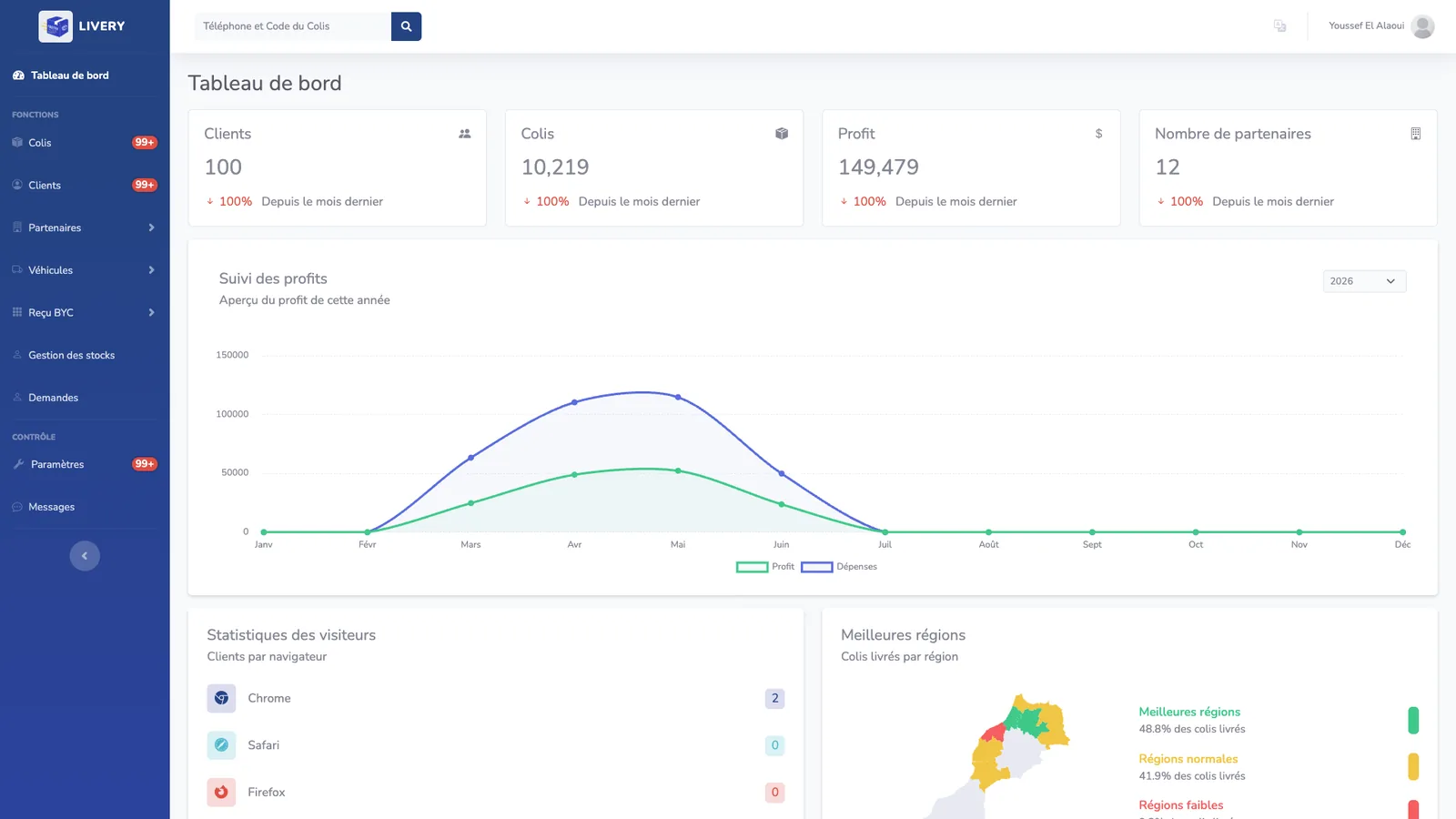
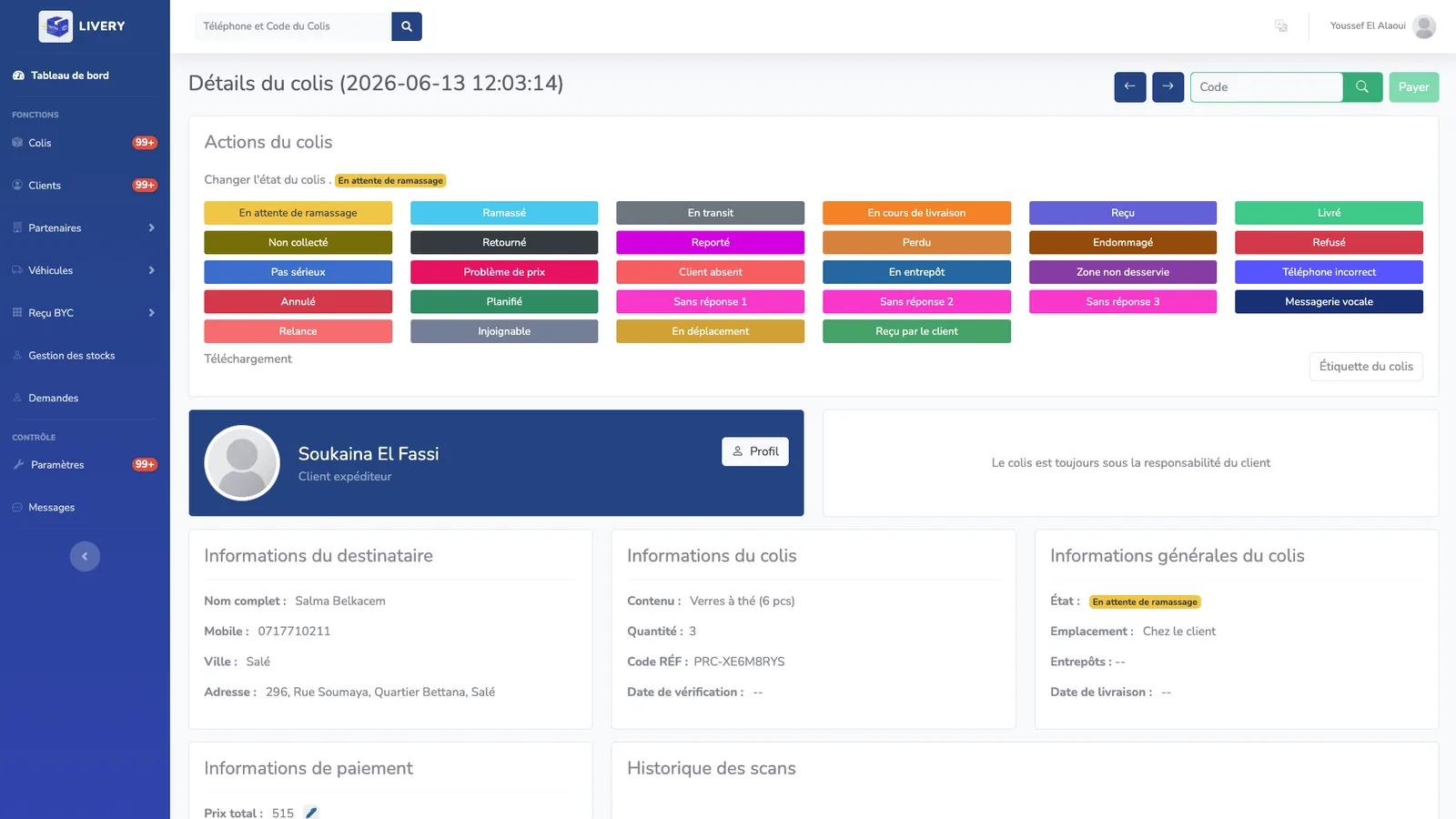
The screenshots in this section are from Fastex, a working delivery management system, because an abstract feature list is far less useful than seeing what these modules look like when they are actually running.
1. A Real Status Model, Not Three Statuses
The difference between amateur and professional delivery software is granularity. "Pending, shipped, delivered" cannot express a refused parcel, a rescheduled drop, a partial return, or a parcel sitting at a branch awaiting collection — and every one of those is a case your support team handles daily. A serious system carries twenty or more distinct statuses and lets a dispatcher move a parcel between them in one click.
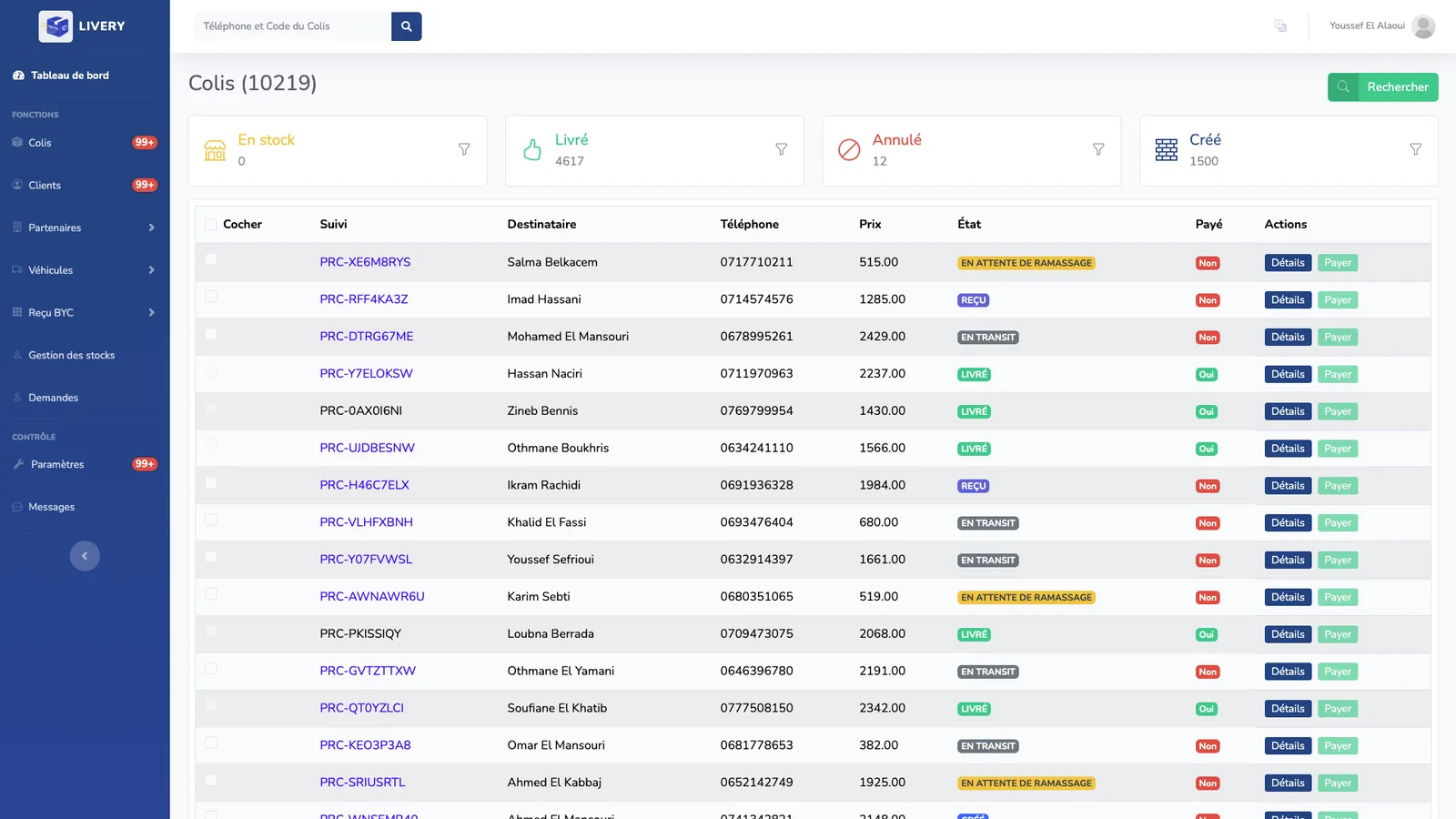
Ask any vendor to show you the status list on day one. If they cannot show it, they have not built for real operations, and you will be paying to discover the missing cases yourself.
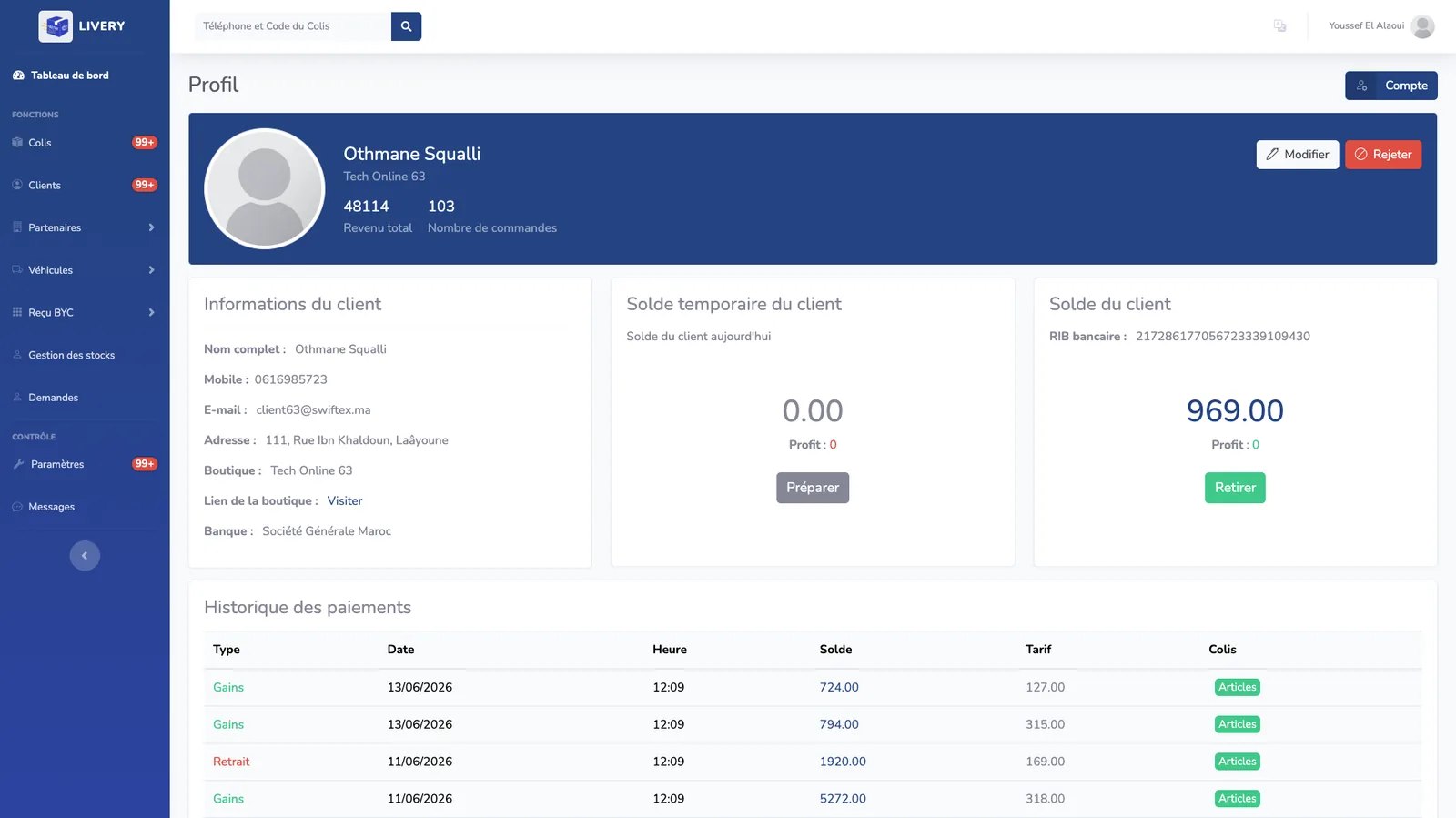
2. Cash on Delivery and Reconciliation
In much of the Middle East, North Africa, South Asia and Latin America, cash on delivery still dominates e-commerce — which means your software is handling money, not just parcels. Every COD parcel creates a chain: the driver collects, the branch banks it, the merchant is owed it, and someone must prove all three happened. Software that tracks parcels but not balances leaves the hardest part of the job in a spreadsheet.
3. Paperwork That Generates Itself
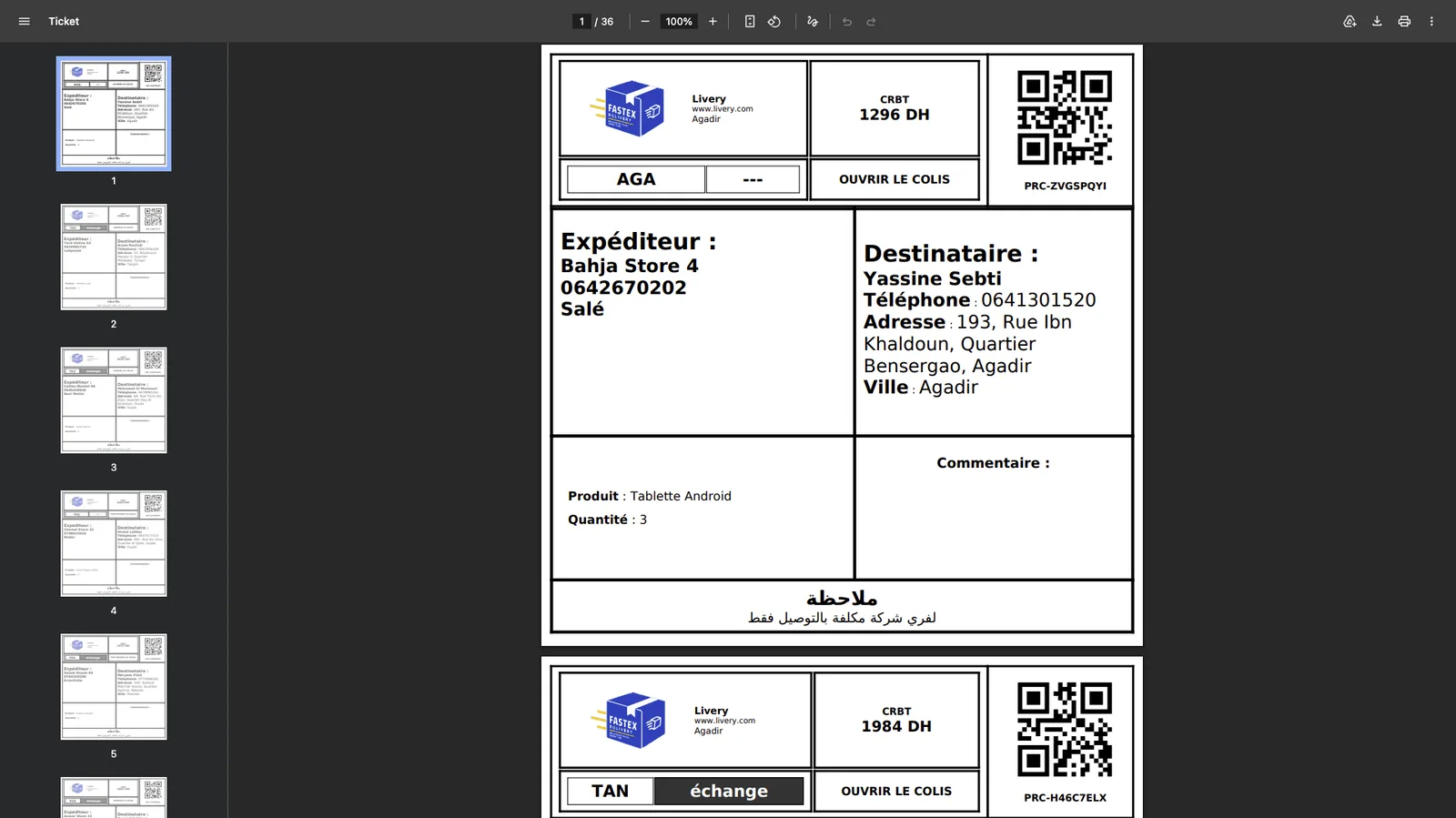
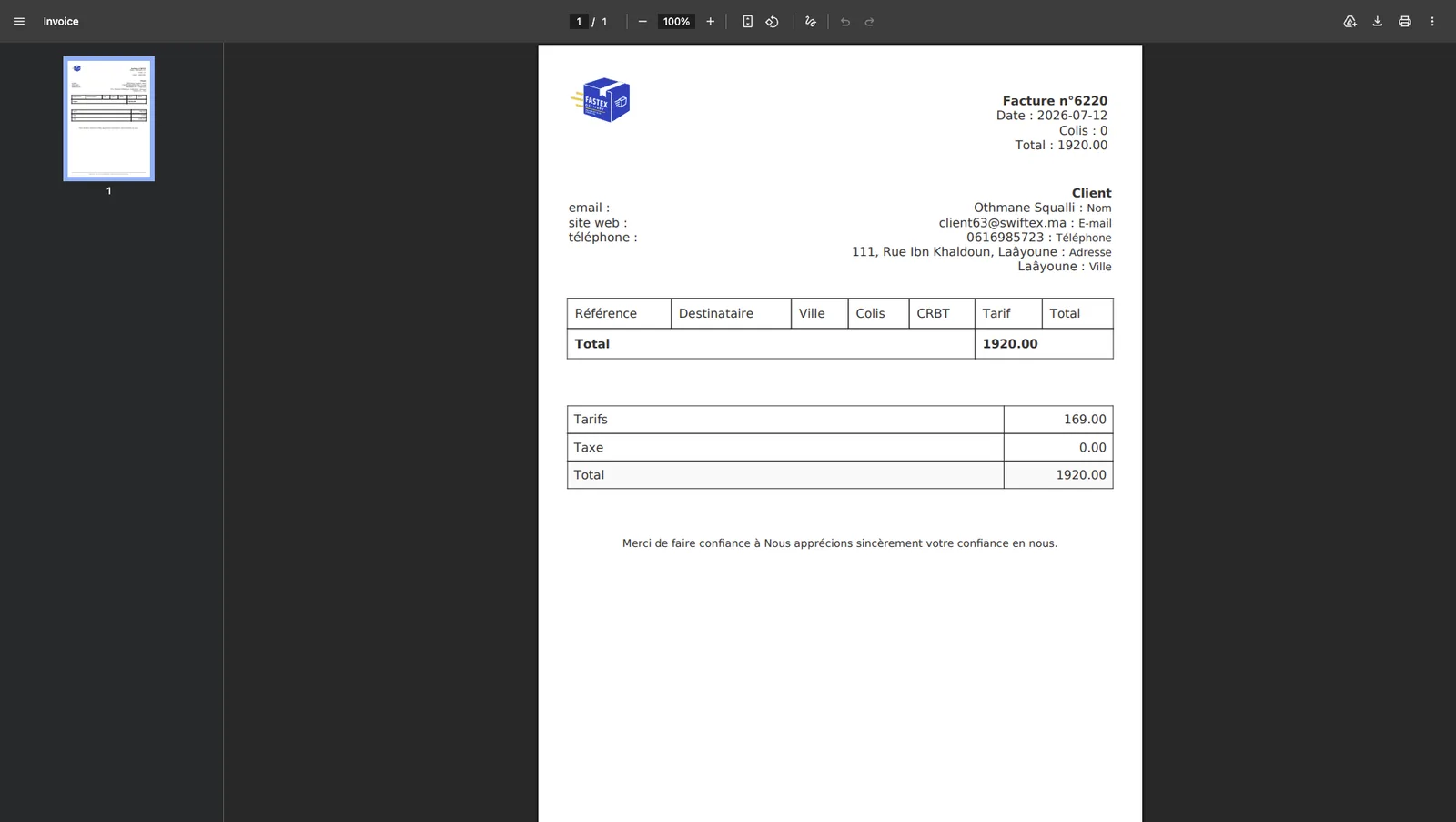
Labels and invoices are unglamorous and they are where the hours actually go. Bulk-printable labels with a scannable code, and invoices assembled from the parcels themselves rather than retyped, are usually the fastest payback in the entire build. If you are specifying label formats, the GS1 barcode standards are the reference to hand your developer — carriers will expect compliance long before you do.
4. A Portal Your Merchants Actually Use
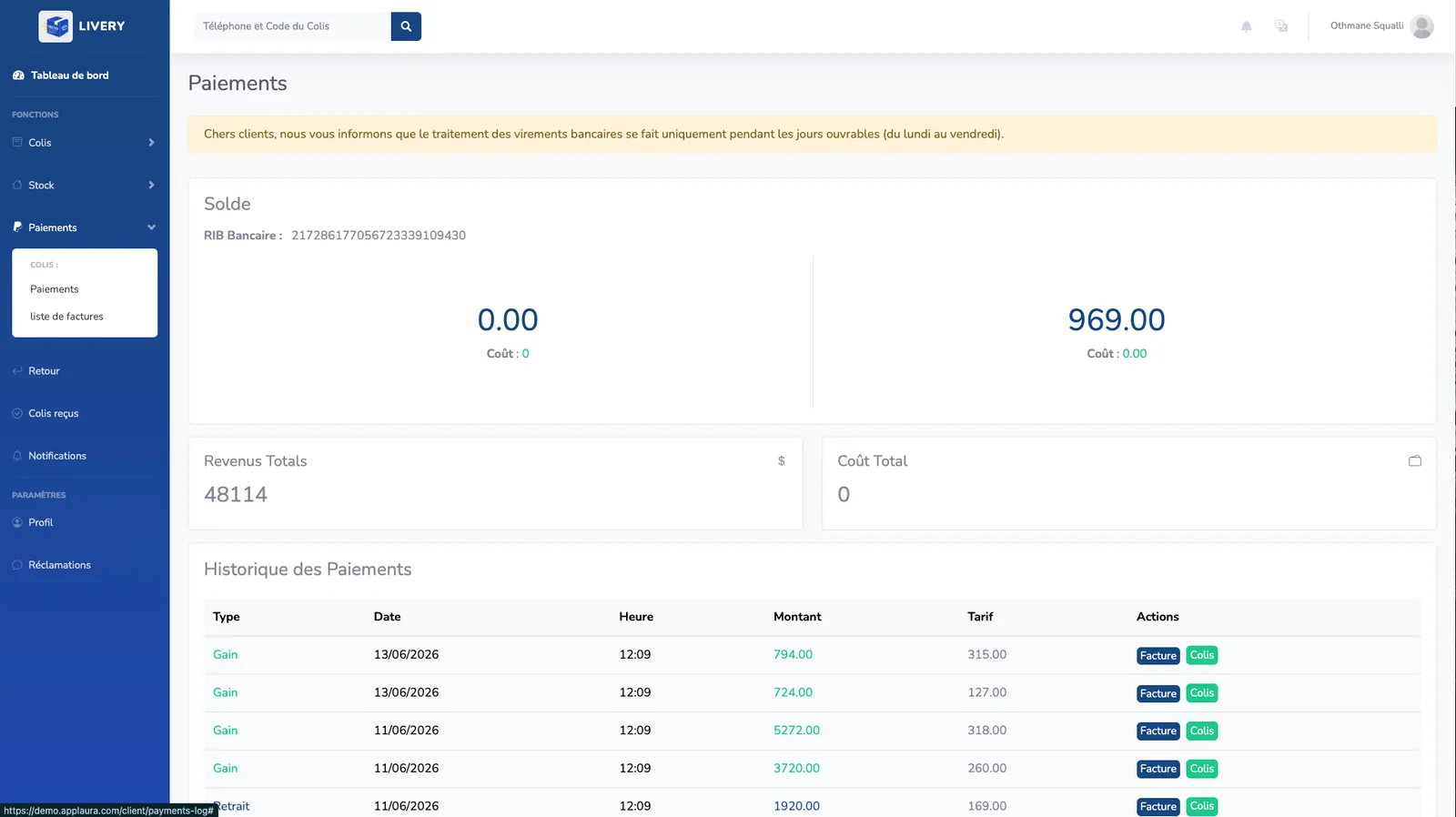
Every question a merchant can answer themselves is a support ticket you never pay for. A portal where clients create parcels, watch their statuses and settle invoices does more for your cost per parcel than most route optimisation will — and unlike routing, it also makes you harder to leave.
5. Routing — Integrate, Do Not Invent
Route optimisation is a genuinely hard computer science problem, and it has been solved by people with more resources than your project has. Use a mature service — the Google Maps Routes API is the common default — and spend your budget on the dispatch rules that are specific to you. Any vendor proposing to write a routing engine from scratch is proposing to spend your money on a research project.
What Usually Does Not Earn Its Keep in Year One
- Predictive demand forecasting — it needs two or three years of your own clean history before it beats a good dispatcher's judgement.
- A customer-facing mobile app — a fast tracking web page does the same job with no store review and no install friction.
- Warehouse robotics integration — real, but it belongs to a much later phase and a much larger operation.
- A custom BI layer — export to a spreadsheet tool for a year and find out which reports anyone actually opens before you build them.
How to Choose a Development Partner
Portfolios are marketing. These seven questions are not, and the answers will tell you more in twenty minutes than a week of proposal-reading.
- Have you built for logistics specifically? Domain knowledge here is worth more than framework expertise. Someone who has never handled a partial return will design a data model that cannot express one.
- Can I speak to an operator who uses what you built? Not a testimonial — a phone call with a dispatcher.
- Who owns the code and the data? Get it in the contract. If the answer is vague, walk.
- What happens if I leave in year two? Ask for the handover plan and the export format before you sign, not after.
- How do you price change requests? There will be change requests. The rate matters less than whether it exists in writing.
- What does the first working version look like, and when? If the answer is later than eight weeks, the scope is too big for a first phase.
- Which parts would you buy instead of build? A partner who cannot name any is selling hours, not outcomes.
Red Flags in a Proposal
- A fixed price for a scope nobody has written down in detail. It is not a price, it is an opening position.
- "AI-powered" as a feature rather than a specific job the model does. Ask what it predicts and what happens when it is wrong.
- No mention of data migration. Your parcels, clients and history have to move, and that work is rarely small.
- A single integration line item covering carriers, payments and accounting all at once.
- A demo that only ever shows the happy path — no refused parcel, no failed scan, no partial payment.
- A timeline with no phase that reaches production before month six.
A Realistic Timeline
For a mid-scope delivery management build, this is the shape that works. The critical property is that something real reaches production early — a system that only goes live at the end is a system whose problems you discover at the worst possible moment.
- Weeks 1–2 — Workflow mapping. Sit with dispatchers and drivers. Every status your operation needs gets written down before anyone opens an editor.
- Weeks 3–6 — Core parcel engine. Data model, status transitions, roles. Unglamorous, and it determines everything built afterwards.
- Weeks 7–10 — Dispatcher dashboard. The screen your team uses all day, tested by the people who will use it.
- Weeks 11–14 — Driver app, labels, proof of delivery. One branch goes live in parallel with your existing process.
- Weeks 15–18 — COD, invoicing, client portal. The money layer, once the parcel layer is proven.
- Weeks 19–22 — Integrations and rollout. Carriers, accounting, remaining branches, migration of live data.
Software cannot fix a process you have never written down. Map the workflow first — half the time, the mapping alone finds the saving.
Frequently Asked Questions
How much does custom logistics software cost in 2026?
A single-workflow MVP typically lands around $25k–$60k, a full mid-scope delivery system around $60k–$180k, and a multi-branch build with ERP and carrier integrations $180k and up. Those are indicative ranges rather than quotes, and your region changes them more than your feature list does. Budget a further 15–20% per year for hosting, maintenance and integration upkeep.
How long does it take to build?
Four to six months for a mid-scope delivery management system, with the first branch running on it around month three. Anything advertised as "two weeks" is a configured product with your logo on it — which may well be the right answer, but it is not a custom build and should not be priced as one.
Should I build or buy a delivery management system?
Buy or configure unless a specific workflow is genuinely yours alone and is worth measurable money. The practical test: write down the three things your operation does differently from every competitor. If an existing platform handles all three, building is a hobby. If it handles none of them, build.
Can custom software integrate with my carriers and accounting?
Usually yes, but confirm it before you sign. Ask each carrier and your accounting provider for API documentation up front. A carrier with no API means file exchange, which works but costs more to build and breaks more often — and that difference belongs in the quote, not in a change request.
What is the difference between a TMS, a WMS and a delivery management system?
A TMS plans freight between locations, a WMS runs what happens inside a warehouse, and a delivery management system runs the last mile to the recipient's door. Most courier and e-commerce operations need the third, occasionally the second, and rarely the first. Buying the wrong one is the most expensive mistake in this whole category.
Final Thoughts
The best custom software for a logistics business in 2026 is almost always smaller than the one being pitched to you. Buy the commodity, build the difference, and insist that something reaches production inside three months.
If you want a second opinion on a proposal already sitting on your desk, or an honest read on whether your operation should build at all, tell me what you are running and I will give you a straight answer — including when that answer is "you do not need a custom build".